We found the SMC Barricade, device for which there is no elegant way to physically arrange (due to its having connections or switches on ALL 4 of it's shorter sides), but was well equipped for the time and I still have in case of emergencies. Not only was it a capable network router for broadband applications, it was also equipped with a parallel port for printer sharing and a serial port that you could configure for a Dial-Up Modem (which we did use for a stretch when our first child was on the way). The Barricade saw us through a brief stint with 802.11a wireless networking, when we bought an SMC access point and PCMCIA wireless card to get our laptop connected from the living room, when we had all of our computers and other devices in the bedroom previously. Sometime around 2003, when these early wireless devices became a little too problematic, and everything seemed to be shifting away from 802.11a, we went looking for a router that not only was faster, but had an 802.11b/g access point built in.
Showing posts with label Fun?. Show all posts
Showing posts with label Fun?. Show all posts
Sunday, February 24, 2013
New Home: New Home Network...
Here's a little bit of home networking history for my household. Somewhere around 1998, I had the opportunity to switch from using a Dial-Up Modem to a Cable Modem, and as with most people, the world became a different place. When I met a nice lady kind enough to consider marrying me, and we bought a house (in 2000), I used the awesome Internet Connection Sharing feature built into Windows (98 and/or 2000) to get the second computer we had onto the internet. This quickly became a problem, so we went and looked for an appliance to manage the internet connection for both computers.

We found the SMC Barricade, device for which there is no elegant way to physically arrange (due to its having connections or switches on ALL 4 of it's shorter sides), but was well equipped for the time and I still have in case of emergencies. Not only was it a capable network router for broadband applications, it was also equipped with a parallel port for printer sharing and a serial port that you could configure for a Dial-Up Modem (which we did use for a stretch when our first child was on the way). The Barricade saw us through a brief stint with 802.11a wireless networking, when we bought an SMC access point and PCMCIA wireless card to get our laptop connected from the living room, when we had all of our computers and other devices in the bedroom previously. Sometime around 2003, when these early wireless devices became a little too problematic, and everything seemed to be shifting away from 802.11a, we went looking for a router that not only was faster, but had an 802.11b/g access point built in.
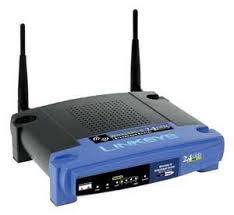 Enter the Linksys WRT54G. Not only was this a very capable router right out of the box, but it ran Linux. There was a growing number of people dedicated to making it better and adding new capabilities. This router saw us through our times with Vonage after we dumped the local POTS, and helped us fool our DirecTivo into thinking it still had a phone connection to connect back to DirecTV. Later it moved with our cable modem from our bedroom/office to the entertainment center in the living room, where it could be directly connected to our Tivo HD ,XBOX 360, Powerline network adapter (for our other PCs in far reaches of the house), and Home Theater PC. The WRT54G served us for many years and still hasn't completely croaked on us (even though it tried to on a few occasions). Currently, it serves most of those same devices, in addition to a number of laptops, Android devices, a network All-in-One printer, a Blu-Ray Player, and occasionally our TV. It has had a long and full life.
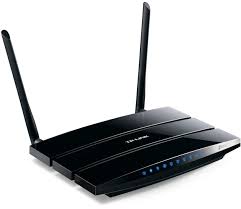 Now (2013), on the verge of us moving to a new (bigger) house we are probably going to need a second access point to fully blanket the house with our WiFi signals. We would also like to be able to take advantage of the HUGE speed increases we have been largely ignorant of in both wired and wireless networking. So we're getting a new router, but one that can run the same custom firmware as the trusty WRT54G, called DD-WRT. The new router is the TP-Link TL-WDR3600, and not only is it bigger/faster/stronger (gigabit Ethernet and dual band 300Mbps wireless), but it adds back some expandibility we've been missing in the form of 2 USB ports, which can be used for printer sharing or storage right out of the box. We'll see what other tricks I can set them up for later on. For now, it will become our main router, and the WRT-54G will retire to a lighter load as auxiliary access point and network switch. We'll be able to have the same interface to administer both, and shouldn't have any issues connecting to WiFi at the end of the house furthest from the router any more.
We found the SMC Barricade, device for which there is no elegant way to physically arrange (due to its having connections or switches on ALL 4 of it's shorter sides), but was well equipped for the time and I still have in case of emergencies. Not only was it a capable network router for broadband applications, it was also equipped with a parallel port for printer sharing and a serial port that you could configure for a Dial-Up Modem (which we did use for a stretch when our first child was on the way). The Barricade saw us through a brief stint with 802.11a wireless networking, when we bought an SMC access point and PCMCIA wireless card to get our laptop connected from the living room, when we had all of our computers and other devices in the bedroom previously. Sometime around 2003, when these early wireless devices became a little too problematic, and everything seemed to be shifting away from 802.11a, we went looking for a router that not only was faster, but had an 802.11b/g access point built in.

Saturday, December 10, 2011
New Life-Partner
For the better part of the year, I've been without my Sony Ericsson K850i. I'm okay with that. Allison and I dropped our feature phones and hopped on the Android bus, and we're both quite happy about it. While I had been well invested in hacking, mods, and generally wringing every last ounce of usability available from my K850, it was getting long in the tooth. It held up well with its compact form factor, great camera, and integrated posting to Blogger. I even found a great (free) bit of GPS software that I could use for geocaching and mapping my hikes.
We have slowly become aclimated to the Android way of life, checking the free app of the day from Amazon, and finding new tweaks to change the ways our phones do things. I've rooted both of our phones (I have an HTC Inspire, and she's got a Motorola Atrix) , and have flased some serious mods on mine.
This post was going to be a long review of all the features we love about our phones and our favorite apps, but after sitting on the first two paragraphs for about two weeks and not getting any further, I can see it needs to be broken up. Stay tuned for more. I'll be discussing the advantages of rooting. finding te right apps for what you want to do with your Android phone, and MAXIMIZING BATTERY LIFE.
This should be fun!

Wednesday, December 02, 2009
Want to play with Google Wave?
I haven't done much with it yet. If you have some ideas you'd like to try out, and for some reason don't have a Wave account yet, feel free to sign up below! 
Blogged with the Flock Browser
Subscribe to:
Posts (Atom)